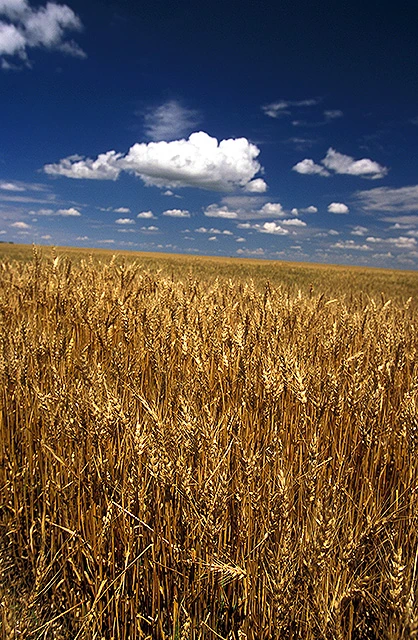
One Field, Different Growth Patterns
A winter wheat field may look healthy from a distance. But does every part grow in the same way? Some areas emerge earlier; others develop slowly. Soil, moisture, drainage and growing conditions can create differences that are easy to miss from the gateway.
Three questions make winter wheat monitoring more useful: What growth stage is your wheat in? Are all areas developing similarly? Which areas need attention? Satellite imagery and NDVI add a view of vegetation patterns across the field. Read alongside crop stage and field observations, they help you choose where to look next.
Winter Wheat Growth Stages at a Glance
A quick reminder of the winter wheat growth cycle:
- Sowing & emergence
- Tillering
- Winter slow growth
- Spring green-up & stem elongation
- Heading & flowering
- Grain filling & harvest
Timing varies by region, sowing date and variety. In mild winters, growth may slow rather than stop.
What Is NDVI and Why Does It Matter?
NDVI is a number that helps show how much green vegetation is present. Its values run from −1 to +1. The key idea is simple: a higher NDVI value usually means more green vegetation.
Lower values → less green vegetation
Higher values → more green vegetation
For example, 0.8 generally indicates more green vegetation than 0.3 under comparable conditions. It does not automatically mean higher yield or tell you whether a crop needs fertilizer. Use NDVI to spot differences, then check the field.
How to Read an NDVI Map
Start with the legend, date and boundary
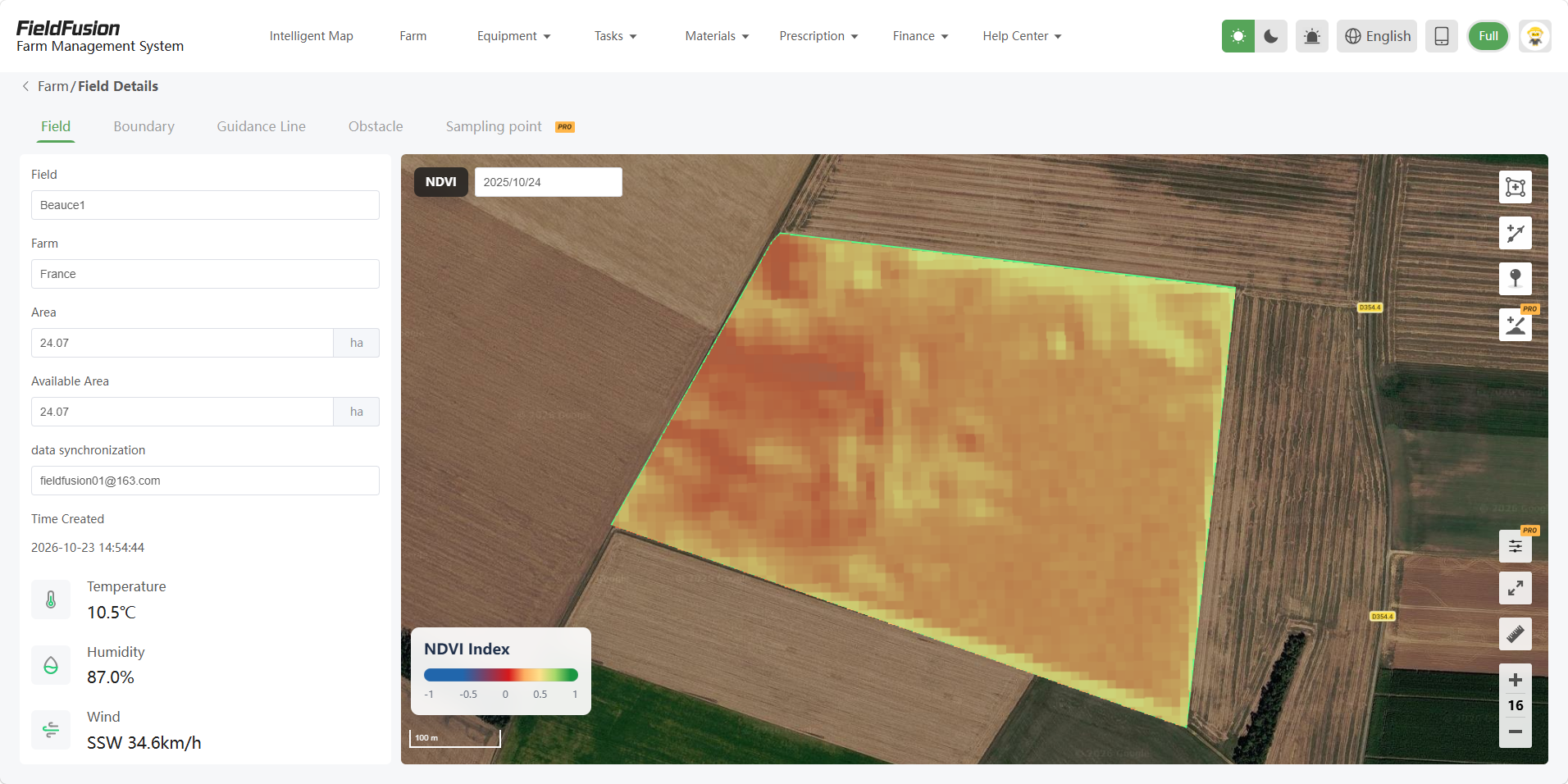
- Check the date: Figure 2 shows October 24, 2025. Make sure the image is relevant to the crop stage you want to inspect.
- Read the legend: values run from −1 to +1. In this palette, green is toward the higher end; orange and yellow represent lower values than green.
- Look inside the boundary: this field is mostly orange, with lighter yellow patches. Those colors help you see where vegetation differs. The thin bright green outline marks the boundary, not a high-NDVI strip.
Start with relative differences, rather than trying to guess an exact number from a color. Different maps can use different palettes, so always check the legend.
Understand differences within the same field
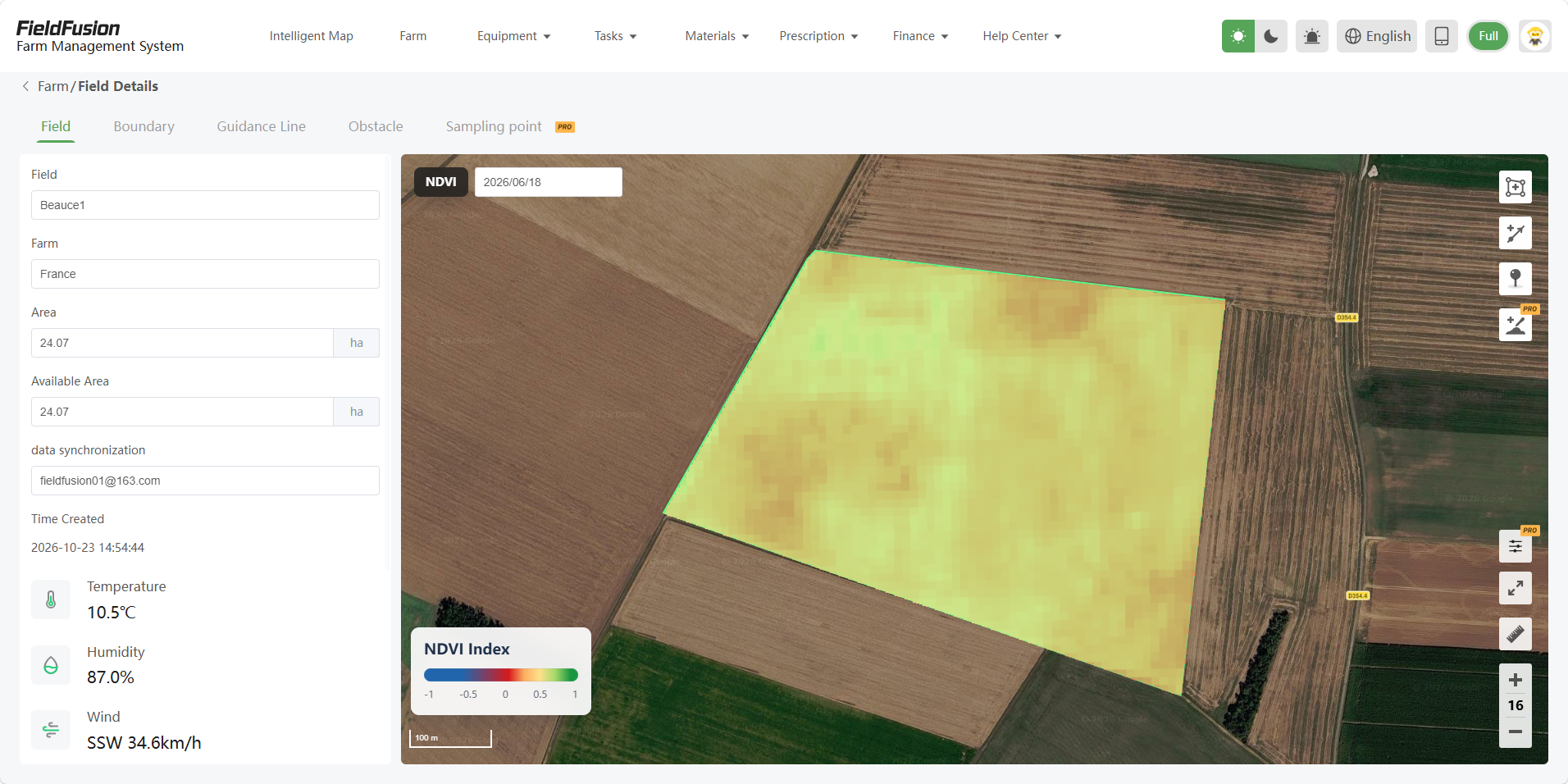
Notice the greener patch toward the upper left of Figure 3, then compare it with the more yellow areas across the center and right. On the same legend, this means the vegetation signal differs within the field. It gives you a practical starting point for choosing where to scout.
Differences can be linked to establishment, soil, moisture, drainage, compaction, nutrition, pests or disease. Weeds can also add green vegetation to the signal. Check plants and soil before deciding what the map means.
Hypothetical example: a farmer notices a lower-NDVI strip beside a wheat field edge. They review previous imagery and recent rainfall, then inspect drainage, plants and soil in that strip and an adjacent comparison area. The cause might be wet ground, traffic or establishment differences. This is a teaching scenario, not a verified customer case.
What to do after finding a low-NDVI area
- Identify the lower-NDVI zone
- Check the date and crop stage
- Compare previous usable imagery
- Inspect plants and soil in the field
- Use findings and agronomic advice
Take photos and record plant counts, rooting, soil moisture and visible symptoms in both the unusual zone and a representative comparison zone. Keep notes against the field so the next image can be reviewed alongside what you actually found.
Comparing NDVI Across Different Dates
Read the Dates, Then Compare the Values
1. Start with the dates
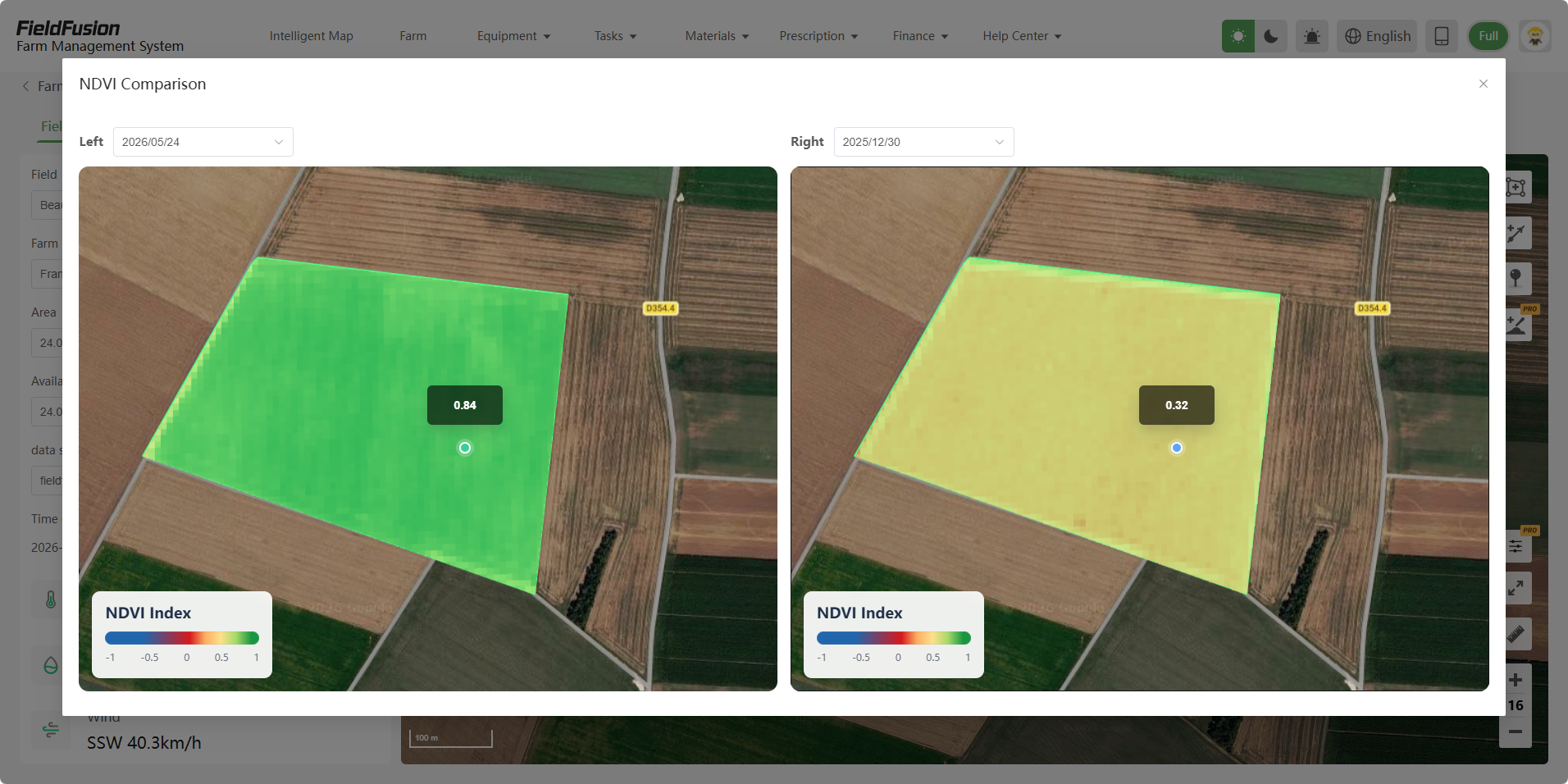
The panes are not arranged from oldest to newest. December 30, 2025 is on the right; May 24, 2026 is on the left. Both show the same field outline and the same NDVI scale, so you can compare corresponding areas.
2. Connect the number with the color
The left-hand map is greener and its selected point reads 0.84. The right-hand map is more yellow and its selected point reads 0.32. The higher displayed value goes with the greener vegetation signal. These readings describe the marked points, not an average for the whole field.
3. Decide what to check next
For winter wheat, a higher NDVI later in the season can accompany more green vegetation as the canopy develops. But the timing depends on local weather, sowing date and growth stage, and this screenshot does not confirm the crop or the cause of the change. Compare usable images, look for areas that keep differing from their surroundings, then inspect those areas in the field.
Use the comparison to plan where to look. Do not use these two point values alone to set fertilizer rates, diagnose a problem or predict yield.
| Observed NDVI pattern | Possible interpretation | Recommended next step |
|---|---|---|
| Increase during active spring growth | Potential canopy development | Check crop stage and field conditions |
| Persistent low-NDVI patch | Possible spatial variability | Visit the zone; investigate the cause |
| Decline near maturity | May reflect normal senescence | Confirm stage before interpreting |
| Unexpected sharp change | Real change or imagery differences | Verify quality, then inspect the field |
Common Mistakes When Reading NDVI
- Assuming greener always means healthier. High NDVI indicates a stronger vegetation signal, not guaranteed yield. Dense weeds can also look green.
- Treating every low area as a fertilizer problem. Drainage, establishment, compaction and other factors can produce similar patterns; identify the cause first.
- Ignoring growth stages. Early exposed soil and late senescence can both lower NDVI for very different reasons.
- Ignoring clouds, snow and image quality. Clouds, shadows, haze and snow can hide or distort the crop signal. Skip unreliable acquisitions.
- Comparing different color scales. Identical colors may represent different values. Check both legends and their scaling.
- Skipping field scouting. Neither an unusual patch nor its apparent recovery establishes a diagnosis without checking the ground.
Also remember saturation: once vegetation is dense, NDVI becomes less sensitive to additional canopy differences. A uniformly high map can still conceal agronomically important variation.
From NDVI Monitoring to Better Farming Decisions
- NDVI observation
- Identify an area
- Field scouting
- Investigate the cause
- Make an informed decision
Create or import field boundaries, review available NDVI imagery, compare useful dates and identify scouting areas. Investigate the causes before preparing management plans or prescription maps. Where variable-rate application is appropriate, rates and zone strategies need reliable field information and agronomic judgment.
Keep each step connected to the field and its records. Read how NDVI supports prescription maps and the farm operations management workflow for the planning steps after an observation.
How FieldFusion Can Help You Monitor Your Fields
FieldFusion provides tools for a repeatable workflow. Its field management tools organize boundaries and guidance lines; FieldFusion PRO includes NDVI viewing, prescription planning and route-planning tools. The supplied comparison screen demonstrates viewing two dates side by side.
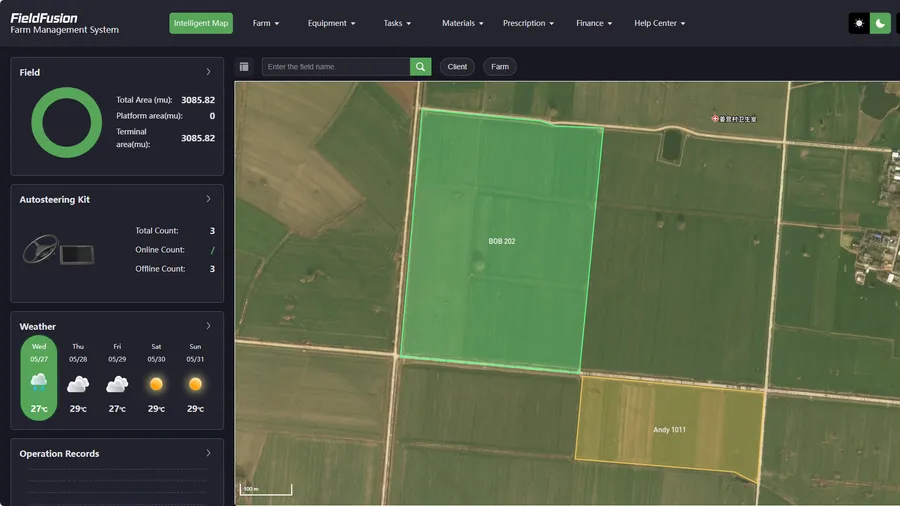
Map your fields
Create or import field boundaries so imagery, observations and plans refer to the right place.
View NDVI and compare dates
Review available imagery and compare vegetation patterns over time to choose where to scout.
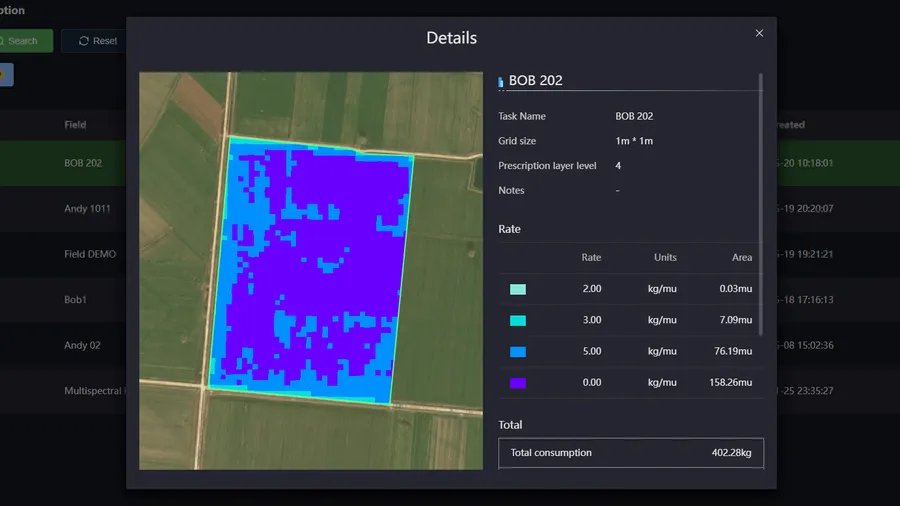
Prepare prescription maps
Turn verified field findings into zones and application plans. Set rates using field evidence and agronomic advice.
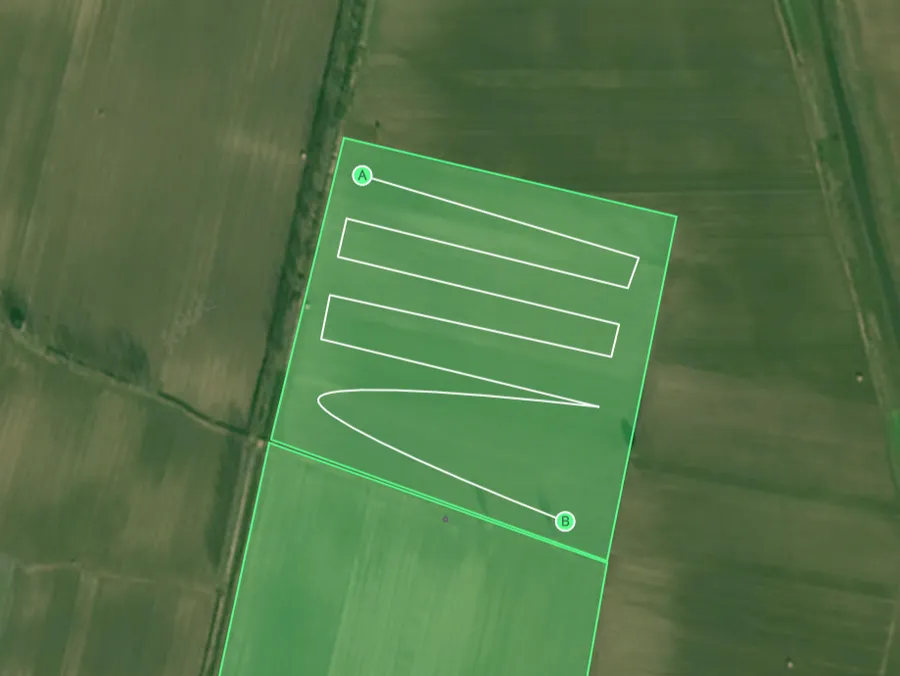
Plan guidance lines
Prepare AB guidance lines on the field map before work begins. Equipment use depends on compatibility.
Click a screenshot to view it full size. These screens illustrate software tools, not verified winter wheat results.
File export, equipment compatibility and synchronization are different capabilities. Confirm the receiving system, format and setup before operations; do not assume complete two-way data exchange across brands. The prescription workflow trial page describes a 7-day offer for that workflow, rather than promising free access to every PRO function. Check account eligibility and current terms.
For another seasonal perspective, explore cotton growth monitoring with NDVI. Its crop calendar should not be transferred to winter wheat.
References and Further Reading
- AHDB — Wheat growth guide, including establishment, tillering, canopy development and grain development and ripening. UK guidance; adapt to local conditions.
- Hyles et al. (2020) — Phenology and related traits for wheat adaptation. Background on wheat development and seasonal timing.
- NASA Earth Observatory — Measuring Vegetation (NDVI & EVI). NDVI background and image-quality limitations.
- USGS — NDVI, the Foundation for Remote Sensing Phenology. Value range, soil influence and saturation.
- Cover photograph: wheat field near Clay Center, Nebraska (K11700-1). Photo by Stephen Ausmus, USDA Agricultural Research Service. Public domain; displayed as an illustrative crop photograph, not the mapped field. Cropped for the cover layout; no USDA endorsement is implied.